Learning goals
We are learning to…
- evaluate and explain our rights and responsibilities when interacting online and make decisions that contribute positively to the development of our digital identity
- select and use suitable strategies, such as asking questions, to monitor and confirm our understanding of texts and solve comprehension strategies
- generate and develop ideas about various topics, including those related to diversity and inclusion, using a variety of resources and lived experiences
Success criteria
I am able to…
- generate questions about a text before, during, and after reading to monitor and confirm my comprehension
- understand and sort digital rights and responsibilities and identify strategies to create a positive digital footprint
- apply my knowledge of digital rights, responsibilities, and footprints to case studies, including proposing possible solutions
- generate ideas about how digital footprints or rights and responsibilities can contribute to an inclusive online community
- create my own digital footprint and a list of strategies that can be used to maintain a positive digital footprint
What do you know about being online?
Consider the following prompts, and record your ideas orally, digitally, in print, or in another method of your choice.
- What social media platforms do you know?
- Do you use any of these platforms.

As an individual, you have certain rights and responsibilities. Rights are freedoms that everyone has and are protected under the law. Responsibilities are duties or things we should do to contribute positively to society. Generally, with each right comes responsibility. For example, you have the right to an education and the responsibility to try your best.
Explore the following statements and sort them into “right” or “responsibility.”
Place the cards into categories that best match. Use the arrow buttons to navigate between cards.

Pause and Reflect
Pause and reflect
Can you think of any other rights and responsibilities you have?
Before you begin, explore the following key vocabulary terms that you will be learning about:
Rights and responsibilities online
In today’s increasingly connected society, technology plays an important role in our daily lives. With an increased use of technology, it is important for you to understand the rights and responsibilities that come with using digital tools and platforms.
Your digital rights refer to the freedoms and privileges that individuals have when using digital tools and platforms. Your digital responsibilities are the ethical guidelines that everyone must consider when using technology.

Student Success
Let’s think!

Can you think of an example of “good” online behaviour? What are some ways that a person could behave respectfully and responsibly on the Internet
There are many online rights and responsibilities to keep track of when using the internet. In the upcoming task, you will be exploring some of the most commonly known examples. As you read more about the examples, there are specific strategies you can use to support your learning!

Reading strategies
One reading comprehension strategy you can use to enhance your understanding is to ask questions while you’re exploring information. Asking questions can help you to clarify your understanding of the text and monitor your comprehension of information as you go.
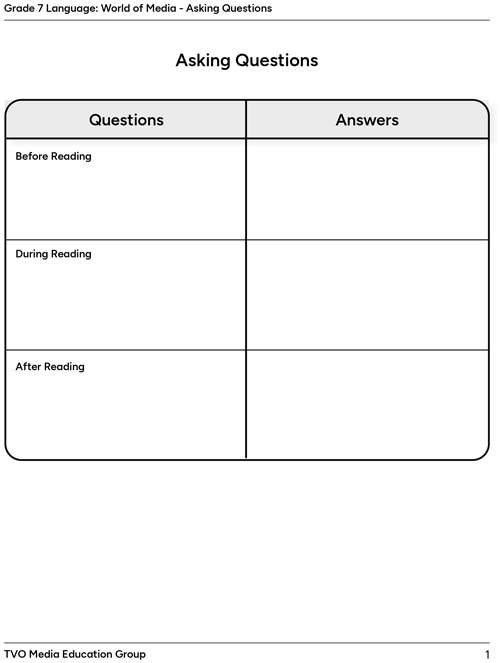
As you explore the following information about digital rights and responsibilities and digital footprints, ask questions before, during, and after reading to help you better understand the information. You can use the prompts in the chart below to help guide your thinking.
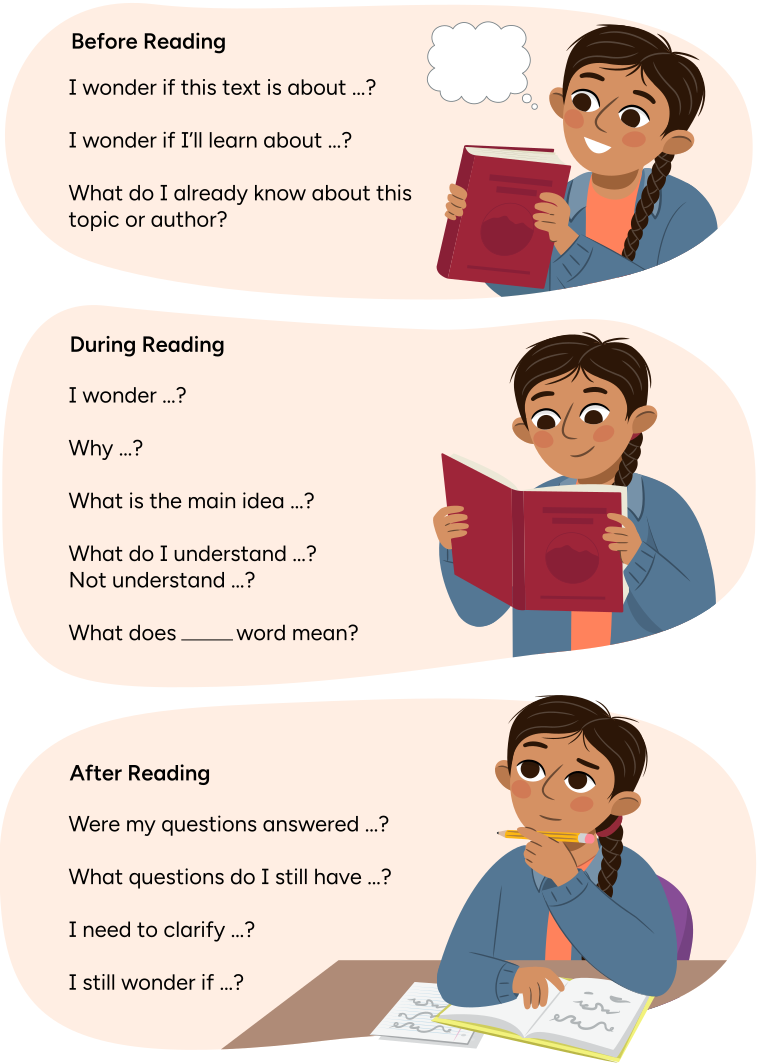
Remy in three images.
In the first image, Remy is holding a holding a closed book. Text reads, “I wonder if this text is about … ? I wonder if I’ll learn about … ? What do I already know about this topic or author?”
In the second image, Remy is holding an open book. Text reads, “I wonder … ? Why … ? What is the main idea … ? What do I understand … ? Not understand … ? What does [blank] word mean?”
In the third image, Remy is thinking and writing in a notebook. Text reads, “Were my questions answered … ? What questions do I still have … ? I need to clarify … ? I still wonder if … ?”
Once you have reviewed the reading strategies, use the graphic organizer provided or another method of your choice to record questions you have before reading. Then explore the following tabs about digital rights and digital responsibilities and record the questions you have during reading.
Complete the fillable and printable Asking Questions document in your notebook or using the following document. If you would like, you can use speech-to-text or audio recording tools to record your thoughts.
Digital rights
Press the following tabs to find out more.
The internet provides various platforms that allow individuals to express themselves freely, share ideas, and engage in discussions on various websites and topics. Similar to offline, everyone online has the right to voice their opinion and beliefs without a fear of censorship.
Everyone online has the right to privacy, including the protection of personal information and data. This means that anything we do online, including communication and personal data, should be protected from those that shouldn’t have access or would misuse the information.
The internet offers access to a wide amount of information and knowledge. Everyone has the right to access this information and seek out knowledge that can empower them to make informed decisions.
Digital responsibilities
Press the following tabs to find out more.
All individuals have the right to respect others’ privacy online by not sharing personal or sensitive information without someone’s consent. This includes accessing or sharing someone else’s private information, such as passwords, without their permission.
When interacting online, it is important to consider and be mindful of your behaviour online. You should treat others with kindness, empathy, and respect. Cyberbullying and harassment are not part of a safe online environment and do not demonstrate responsibility online.
Use technology ethically and responsibly by respecting others and ensuring that we don’t copy anyone else’s work, which is also known as plagiarism or copyright infringements. It is important when we search for information online that we give credit to the original creators.
Explore the following video clip entitled Digital Rights and Responsibilities, and continue to record your learnings about digital rights and responsibilities in the form of questions (adding any new questions to your list).
Check your understanding of your learning of digital rights and responsibilities by completing the following multiple choice quiz.
Select the correct answer, then press Check Answer to see how you did.

Try It
Try it
At this point, go back and revisit your asking questions organizer. Are there any questions you could add to your “After Reading” section?
Digital footprint

By understanding your digital rights and responsibilities, you can contribute to building a positive digital footprint. So, what is a digital footprint?
A digital footprint is like a path of information that you leave behind when you use the internet. This information includes websites you visit, emails you write, and things you do online, such as downloading or uploading information. Everything you do online contributes to your digital footprint.
You can build your digital footprint in two ways – actively and passively.
An active digital footprint is data that you leave online on purpose, such as posting on social media, completing online surveys and forms, or agreeing to visit websites.
A passive digital footprint is data that you leave unintentionally or without knowing. It includes data that is collected by monitoring your browser and websites that use tracking devices or logging without your knowledge.
Pause and Reflect
Pause and reflect
What do you think contributes to your digital footprint? Record your ideas in a method of your choice.
Press the Possible Answers button to learn more.
Many things contribute to your digital footprint, such as:
- content published or posted online
- conversations through messaging apps or gaming platforms
- interactions with content (such as likes, shares, reactions)
- subscriptions to websites or videos
- ratings or reviews posted
- connections with online communities
Digital footprints are permanent and can always be linked back to you, even if you think they are deleted. To keep yourself safe, it is important to consider your actions online and ensure you are always contributing to a positive digital footprint. Use the following guidelines to take precautions to help protect yourself.
- Think before you post and consider the impact of your actions online.
- Treat others with respect online to contribute to a positive and inclusive digital community.
- Keep social media accounts set to private and safeguard your personal information.
- Only accept people you know in real life on online platforms.
Check your understanding of digital footprints through the following true or false activity. Select the correct answer, then press Check Answer to see how you did.
Reflect on your learning by responding to the following questions in your notebook, or another method of your choice.
- Can you think of anything else you can do to protect yourself online and contribute to a positive digital footprint?
- Consider your own digital footprint right now. Do you feel your digital footprint is positive? Why or why not?
- Are there any more questions that you can add to your graphic organizer for during or after reading?
Evaluating case studies
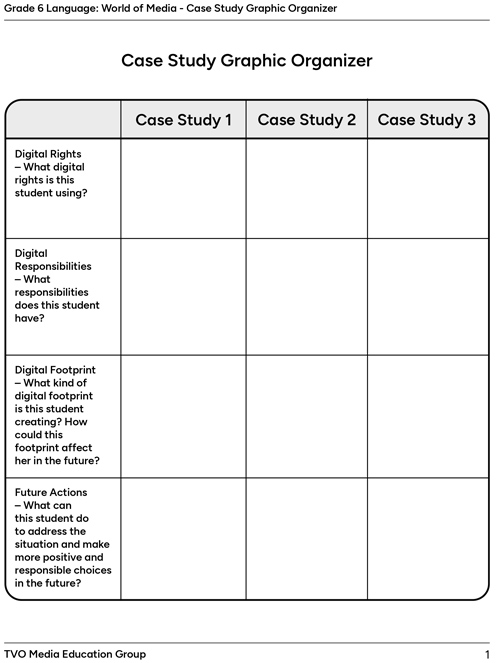
In this section of the learning activity, you are going to be exploring a few fictional case studies about students who are using online platforms. As you explore the case studies, you are going to be asked to reflect on the following questions.
- Digital rights – What digital rights is this student using?
- Digital responsibilities – What responsibilities does this student have?
- Digital footprint – What kind of digital footprint is this student creating? How could this footprint affect them in the future?
- Future actions – What can this student do to address the situation and make more positive and responsible choices in the future?
Record your ideas using the fillable and printable Case Study Graphic Organizer, your notebook, or another method of your choice. If you would like, you can use speech-to-text or audio recording tools to record your thoughts.
Press the following tabs to learn more.
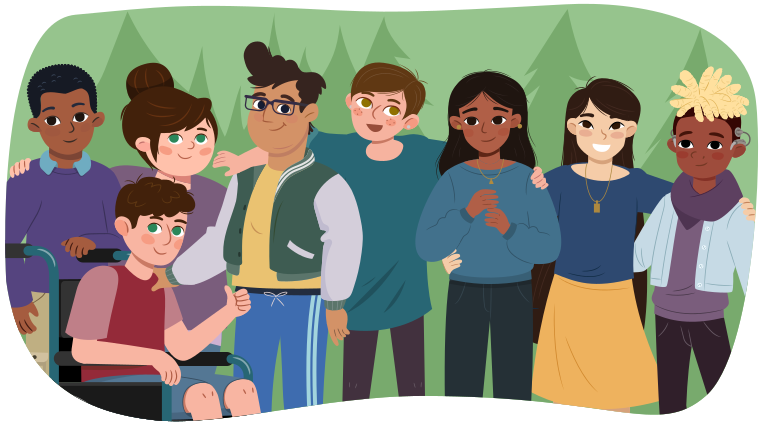
There is a student in grade seven who loves social media. They like to use apps to connect with their friends and share updates about their life. Recently, this student attended a get-together after school with some friends. In the photo, they are all laughing and having a great time. The post got several likes and comments from friends, and it made this person feel very happy, welcomed, and popular.
A few days later, this student received a private message from a classmate that they didn’t know very well. The message said that they had seen the photo posted and recognized someone in the background. Then they said that person in the background wasn’t supposed to be at the get-together.
The student who posted the photo felt worried and embarrassed. They hadn’t noticed the person in the background when they posted the photo and were concerned about the consequences of sharing it online. They realized that by posting the photo, they had revealed information about the get-together that was private.
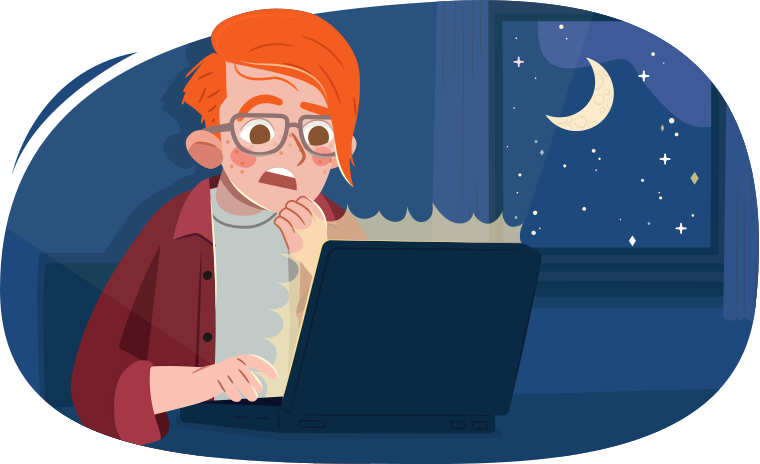
A student in grade seven is working on a research project about invasive species. They have been working hard, but their teacher is pressuring them to hand in their projects tomorrow, and this student is worried they won’t finish in time.
This student takes information from a website and copies and pastes it onto their project. They forget to record information about the original creator of this information, and they share the information with the class as though it is their own ideas.
After their presentation, the student is left wondering if they followed their rights and responsibilities online, and what their teacher will think if they find out.
A student in grade seven is added to a group chat conversation with several other peers in their class. When added, they look through the list of friends and confirmed that everyone in the group is someone they know and go to school with. Mostly, the group chat about projects at school and social events coming up.
One day, two of the members in the chat get into a disagreement about something. One of the members gets frustrated and starts to make unkind and hurtful comments to the other one. A few other members join in and say unkind things as well. The student who is being attacked leaves the chat eventually.
The original student who was added to the group chat feels upset about the hurtful things that were said and is worried about the student who left the chat because of it.
Once you’ve completed your organizer, or response to the questions, check your ideas with the answer key below.
Press the Answers button to learn more.
| Case study 1 | Case study 2 | Case study 3 | |
|---|---|---|---|
| Digital rights – What digital rights is this student using? |
The student who posted the photo has the right to express themselves freely. The person in the photo background is entitled to privacy. |
This student has a right to access information online to enhance their knowledge. | This student has the right to express themselves online. |
| Digital responsibilities – What responsibilities does this student have? | The person who posted the photo should respect the other person's right to privacy, and should only have shared the photo with their consent. | This person has the responsibility to use technology ethically, which includes not copying others' work and avoiding plagiarism. | This student has the responsibility to be mindful of online behaviour – treating others with kindness and empathy. |
| Digital footprint – What kind of digital footprint is this student creating? How could this footprint affect them in the future? | This photo could have negative impacts on the other person, and impacts the poster's digital footprint negatively. | This is creating a negative footprint because the teacher will be able to see the source of the information. This can impact the student both in the digital and real world. | This situation associates this student with negative behaviour online, contributing to a negative digital footprint. |
| Future actions – What can this student do to address the situation and make more positive and responsible choices in the future? | This student could take the photo down (although never permanently deleted) and apologize to the student who was in the background. They could consider this when posting photos in the future, and always check to ensure everyone in the photo consents to it being posted. | The student could admit their mistake to the teacher and offer to re-do the project if possible. They can go back and put the information into their own words, being careful to properly cite the source and give credit to the creator. | This student could also leave the group chat, and explain they are leaving because they will not tolerate cyberbullying or harassment. If possible, they could seek out the member who was hurt by the conversation and check on them. They can also let an adult know. |

Social Emotional Learning
Social emotional learning

You’ve just explored digital footprints. Take a break before continuing onto the next part!
Creating an inclusive online community

Vocabulary
At the beginning of this learning activity, you explored a set of vocabulary words and then came across them again throughout the learning activity. Check your understanding of these words by matching each term to the definition.
As you work on the following writing task, do your best to incorporate these vocabulary words into your writing.
Inclusive digital communities
When you follow digital rights and responsibilities and contribute to a positive digital footprint, you contribute to an inclusive digital community. An inclusive digital community is an online environment where all individuals feel welcomed, respected, and valued.
In an inclusive community, diversity is celebrated and a sense of belonging is fostered for all members. It creates a digital space where people can work together and learn from each other to create a safe and supportive space.
Explore the following video entitled Writing Process to learn more.
Part of the writing process is to generate and develop ideas and details about various topics. In this section of the learning activity, your task is to generate ideas for a blog post or audio recording that you can share with a grade seven class.
You have two topic choices for your creation:
- How can following the digital rights and responsibilities contribute to an inclusive digital community?
- How can creating a positive digital footprint contribute to an inclusive digital community?
Your presentation should include information that you just learned about digital rights and responsibilities and/or positive digital footprints, as well as information about your own experiences online. What tips can you recommend for others to create an inclusive digital community?
Generate your ideas in your notebook, or in another method of your choice.

Linking verbs
Linking verbs are verbs that connect the subject of a sentence with an adjective, noun, or descriptive phrase. Unlike action verbs (that show an action), linking verbs describe a state of being or a relationship between the subject and the verb.
Examples of linking verbs are:
- appear
- look
- seem
- indicates
- go
- stay
- remain
- smell
- taste
- feel
- sound
- get
- come
- act
- is/was/will be
The linking verb falls between the subject, which is the person or object (thing) that the sentence is about, and the subject complement, which is the word or phrase that identifies or describes the subject.
Check out the following video entitled Linking Verb Examples to explore examples of linking verbs.
Explore the following sentences and identify the subject, linking verb, and subject complement in each sentence. Record your ideas in your notebook, or in another method of your choice, and check your answers once complete.
Asking questions

In this learning activity, you used the reading comprehension strategy of “Asking Questions.”
How did asking questions help you to better understand the information? Were there any questions that were left unanswered? How could you find the answer to these questions?
Let’s check!
Sort the following into your digital rights and digital responsibilities.
Place the cards into categories that best match. Use the arrow buttons to navigate between cards.
Consider what you’ve learned so far and respond to the following questions in your notebook, or in another method of your choice.
- How are digital rights and responsibilities connected to your digital footprint?
- Why is it important to maintain a positive digital footprint?
Putting it all together
Try It
Try it
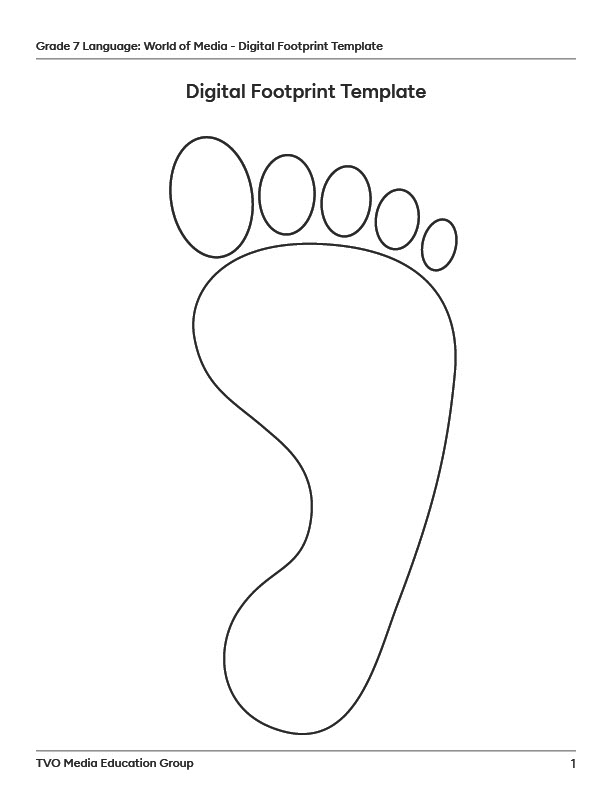
Your task is to create your own digital footprint. Using the template below or another method of your choice, record as much as you can about your own digital footprint. You may choose to write words, draw, add images, or a combination of these.
Consider the prompts in the following checklist.
Digital footprint prompts
Complete the fillable and printable Digital Footprint Template in your notebook or using the following document. If you would like, you can use speech-to-text or audio recording tools to record your thoughts.
Managing my digital footprint
Now that you understand your own digital footprint, create a list of ten tips for managing your digital footprint while upholding your digital rights and responsibilities when navigating online platforms. Each tip should be accompanied by a brief explanation or example of why it’s important.
Create the list in a method of your choice. If possible, share this with someone else.
Once your list is created, reflect on your understanding of the content you learned in this learning activity using the following checklist.
Reflecting on my understanding
Reflection
As you read the following descriptions, select the one that best describes your current understanding of the learning in this activity. Press the corresponding button once you have made your choice.

I feel...
Now, expand on your ideas by recording your thoughts using a voice recorder, speech-to-text, or writing tool.
When you review your notes on this learning activity later, reflect on whether you would select a different description based on your further review of the material in this learning activity.